Trust Center
Privacy & Data Handling
Every category of data, who can access it, how long it is kept and what deletion removes. Your clients' data first, then your own data as a coach.
Last updated: 4 October 2026
Two kinds of data
The Trust Center separates two kinds of data everywhere: your clients' data and your own data as a coach.
Your clients: the people who chat with your agent.
You, the creator: the coach who builds and operates agents.
End-user data
When a coach deploys an agent, the people who talk to it are the coach's clients. In Private Mode, their conversation content is not available in creator dashboards or Magif support tooling.
Conversation messages
End userEverything a client types to an agent, and every reply the agent sends back.
- Who can access it
- Set by a single per-agent toggle, the fully private conversations switch on the agent's ethics page. In standard mode the coach who operates the agent can review conversations from the dashboard, and Magif can access them for support purposes. In fully private mode no one can read conversation content through the platform: not the coach, not Magif; dashboards show counts only. The same gate applies to coach and Magif identically, with no admin bypass. An end user who starts chatting under fully private stays private even if the coach later switches the agent back to standard.
- How long it is kept
- Kept while in use, subject to the inactivity process: deleted after 90 days of inactivity for anonymous clients, 365 days for signed-in clients.
- Deletion
- Deleting a conversation removes the conversation and its messages together with the background jobs derived from it. The agent's memory of a participant is removed when the participant's account data is deleted, when a coach clears that participant from the agent, or when the retention process clears the participant's conversations.
Agent memory
End userNotes an agent keeps about one specific client so the next session can build on the last one: preferences, goals, progress.
- Who can access it
- No one can read memory content through the platform, in any mode. It can only be deleted.
- How long it is kept
- Kept while the related conversations are retained.
- Deletion
- Removed when the participant's account data is deleted, when a coach clears the participant from the agent, or when the retention process clears the related conversations.
Files shared in chat
End userDocuments or images a client attaches to a chat message for the agent to read.
- Who can access it
- Files are reached through their conversation, so they follow its privacy mode: in standard mode the coach can open them and Magif can access them for support; in fully private mode no one can reach them through the platform.
- How long it is kept
- Kept while the related conversation and account exist, subject to the same inactivity process as conversations (90 days anonymous, 365 days signed-in).
- Deletion
- The file's link to its conversation is removed when the conversation is deleted or the inactivity process triggers. Stored file objects are removed under the file-storage retention process.
Voice notes
End userVoice messages a client records in the chat instead of typing.
- Who can access it
- No one. The audio is transcribed and immediately discarded; it is never stored. The resulting text follows the access rules for conversation messages.
- How long it is kept
- The text follows the retention rules for conversation messages. The audio is not kept.
- Deletion
- Deleted with the conversation it belongs to.
Client account details
End userWhat identifies a client on the platform: email address, name and an optional phone number for signed-in clients, or a random identifier for clients who chat without creating an account.
- Who can access it
- The coach who operates the agent, to identify and follow up with their own clients. Magif personnel only for support and troubleshooting.
- How long it is kept
- Kept while the account is active. Anonymous identifiers follow the 90-day inactivity process.
- Deletion
- Removed on account deletion request.
Session analytics
End userUsage signals from the chat surface: pages visited, time spent, message counts. This is about usage, not the content of messages.
- Who can access it
- The coach who operates the agent, as aggregate usage on their dashboard. These are usage signals, not message content.
- How long it is kept
- Page-level usage records expire automatically after 90 days.
- Deletion
- Expires automatically; also removed on account deletion request.
Coach data
The material a coach brings to the platform: knowledge, configuration, offers and billing.
Knowledge-base documents
CoachThe documents a coach uploads to teach their agent: method guides, frameworks, worksheets, session material.
- Who can access it
- You, the coach who owns the workspace. Magif personnel only for support and troubleshooting.
- How long it is kept
- Kept while the knowledge base exists.
- Deletion
- Removed when the coach deletes the file or the knowledge base.
Knowledge-base index (embeddings)
CoachA numeric search index built from knowledge documents so the agent can find the right passage quickly. On its own it is not readable text.
- Who can access it
- You, the coach who owns the workspace. Magif personnel only for support and troubleshooting.
- How long it is kept
- Kept while the related knowledge base exists.
- Deletion
- Removed when the related knowledge content is deleted.
Agent configuration
CoachHow a coach sets an agent up: instructions, tone, opening message, enabled features and privacy settings.
- Who can access it
- You, the coach who owns the workspace. Magif personnel only for support and troubleshooting.
- How long it is kept
- Kept while the agent exists.
- Deletion
- Removed when the coach deletes the agent.
Offers and offer pages
CoachThe offers a coach sells and the pages that present them: pricing, description, page design and images. Published offer pages are public by design.
- Who can access it
- You, the coach who owns the workspace. Magif personnel only for support and troubleshooting.
- How long it is kept
- Kept while the offer exists.
- Deletion
- Removed when the coach deletes the offer.
Creator assistant conversations
CoachA coach's own conversations with the MAX assistant while building and improving their agents.
- Who can access it
- You, the coach who owns the workspace. Magif personnel only for support and troubleshooting.
- How long it is kept
- Kept while the account is active.
- Deletion
- Removed on account deletion request.
Dashboard usage
CoachHow a coach uses the dashboard: pages visited and features used.
- Who can access it
- You, the coach who owns the workspace. Magif personnel only for support and troubleshooting.
- How long it is kept
- Page-level usage records expire automatically after 90 days.
- Deletion
- Expires automatically; also removed on account deletion request.
Shared platform data
Operational data the platform keeps to run reliably for everyone.
Billing records
BothSubscription and payment records: a coach's Magif subscription, and a client's subscription to a coach's offer. Plan, status, invoices, token usage. Full card numbers are held by the payment provider, never by Magif.
- Who can access it
- The coach, for their own subscription and their clients' subscriptions to their offers. Magif personnel only for support, troubleshooting and accounting. Full card numbers are held by the payment provider, never by Magif.
- How long it is kept
- Kept while the account is active and as required for accounting.
- Deletion
- Removed on account deletion request, except records legally required for accounting.
Application logs
BothTechnical records of what the platform did: requests, errors, performance. Used to keep the service reliable and secure.
- Who can access it
- Operational access only, for authorized Magif personnel on a least-privilege basis to keep the service reliable and secure. There is no interface for browsing conversation content through logs.
- How long it is kept
- Kept for 15 days, then expires automatically.
- Deletion
- Expires automatically after 15 days; not retained indefinitely.
Backups
BothEncrypted copies of the primary database used to recover from failures.
- Who can access it
- Operational access only, for restoring the platform after a failure. There is no interface for browsing conversation content in backups.
- How long it is kept
- Kept on a rolling window of at most 1 year; expire automatically.
- Deletion
- Data removed from production leaves backups as those backups expire, within 1 year at most.
Who can read conversations
Each agent runs in one of two privacy modes, chosen per agent. The mode decides who can read the conversations your clients hold with that agent.
Standard conversations
DefaultIn standard conversations, the coach who operates the agent can open and read the conversations held with that agent, to supervise quality and follow up with clients. Magif personnel do not browse conversations. Access is limited to support and troubleshooting, on a need basis.
Fully private conversations
FreeIn fully private conversations, the coach sees that conversations happen and how many. Never their content. Conversation content is not readable through the platform by Magif personnel.
Magif does not use customer or end-user conversations to train AI models, and its inference-provider arrangements prohibit training on submitted customer content.
Verified 21 September 2026View the walkthroughHide the walkthrough
We took one real conversation on a Private Mode agent and looked at it from every side: what the client sees, what the creator sees in their own dashboard, and what our internal support tooling can reach. The client can read their conversation. Nobody else can.
- 1
The client is told the conversation is private
Before sending a message, the client sees a disclosure. On a Private Mode agent it states plainly that nobody, not the creator and not Magif, can ever read the conversation.
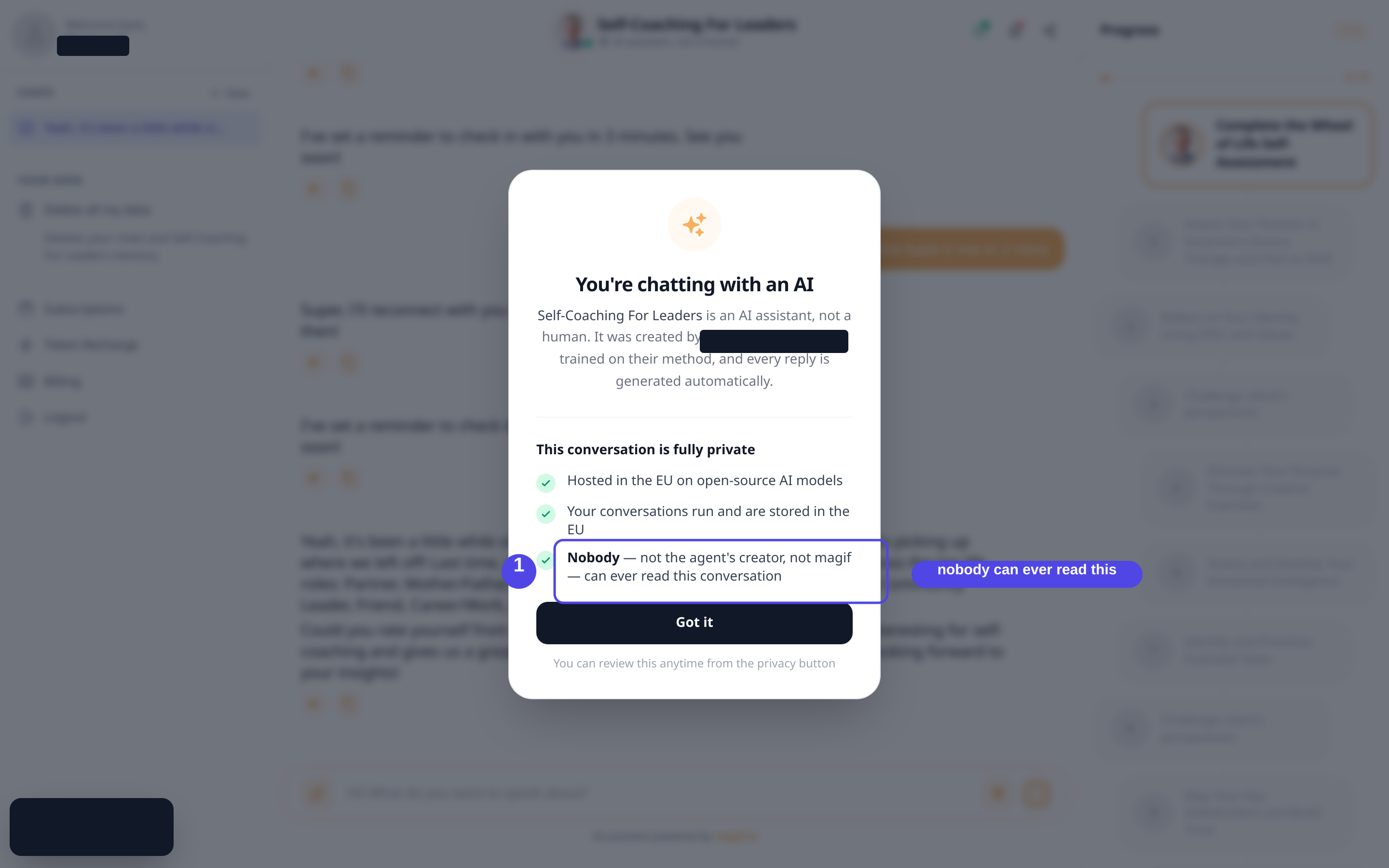
The first-visit disclosure a client sees on a Private Mode agent. Opens full size in a new tab. - 2
The client can read their own conversation
The client holds a normal, complete conversation. Every message is visible to them, exactly as it should be.
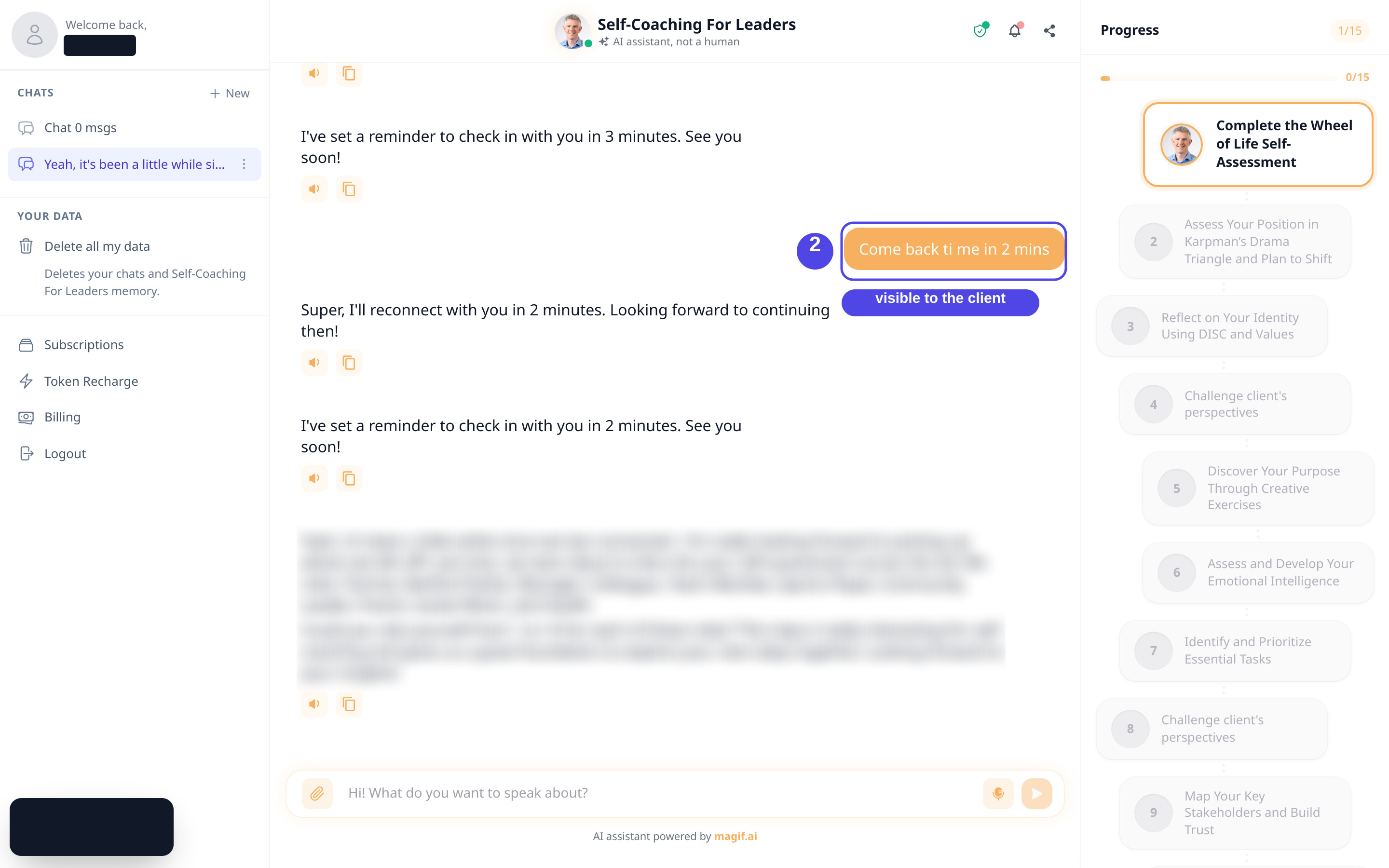
The client's own view of the conversation. Message content is redacted here for publication. Opens full size in a new tab. - 3
The creator sees counts, never content
In the creator’s own dashboard, the same agent shows a private badge and a count of conversations. Private conversations add to the count, but they create no user or message rows the creator can open. There is no message text to read.
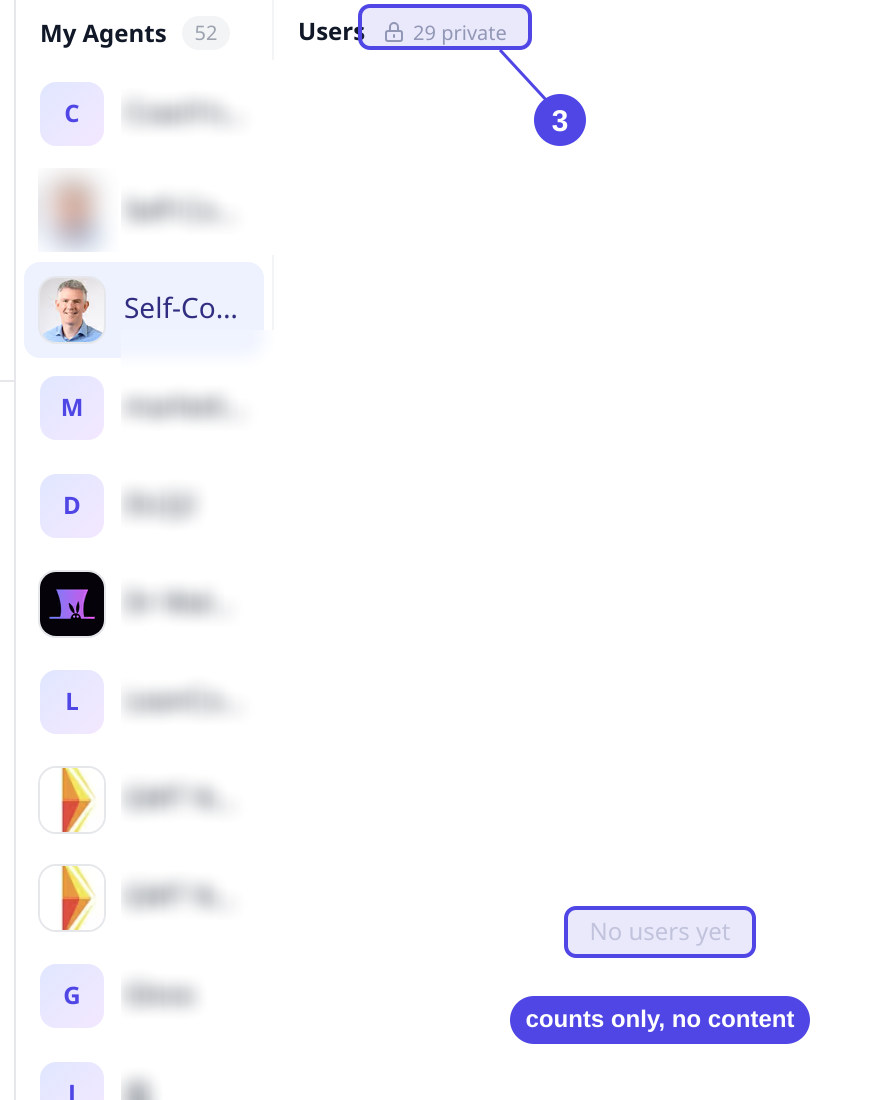
The creator’s dashboard for the same agent: a private badge and a count, with nothing to open. Opens full size in a new tab. - 4
Support tooling returns no content either
Magif’s internal support and import tooling, used with elevated access, resolves the same participant to a conversation count only. The conversation body cannot be opened.
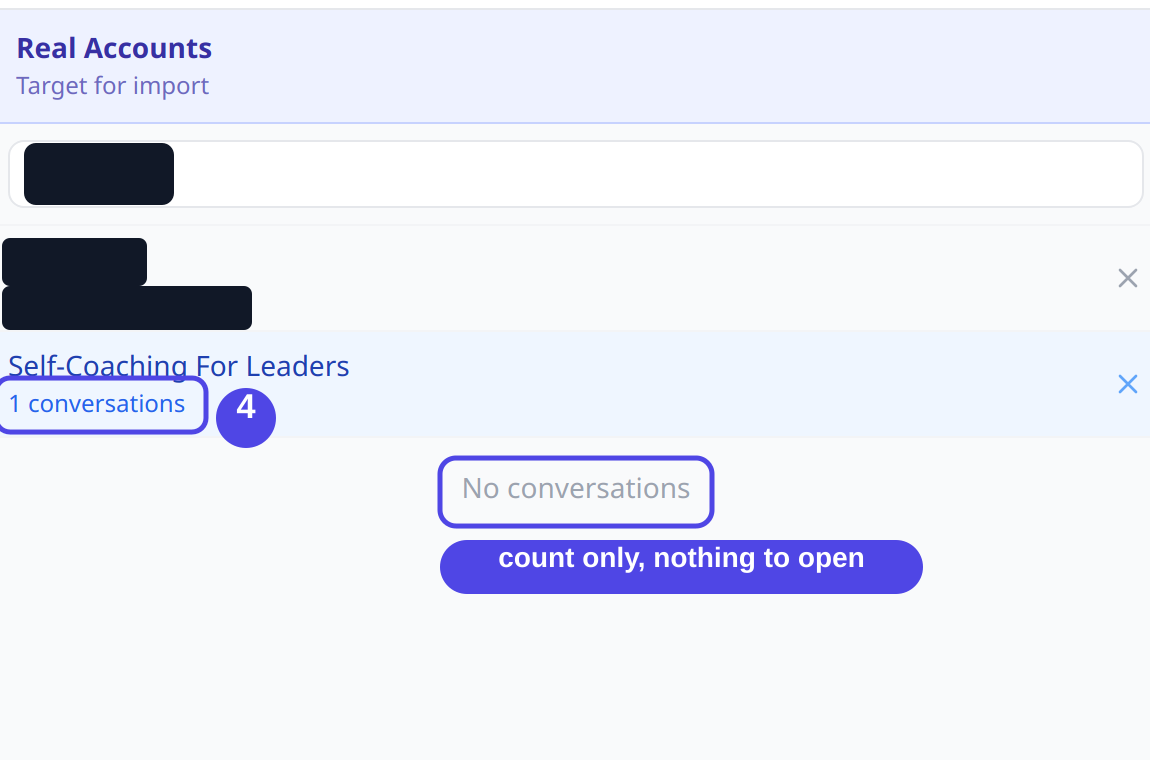
Internal admin tooling: the conversation is counted, but there is nothing to open. Opens full size in a new tab. - 5
The same conversation, checked at every surface
We requested the same conversation through each surface a person could actually use. Only the client themselves receives the content.
Recorded output
Client, viewing their own conversationFull conversation returnedCreator, opening the conversation detailHTTP 403 · "This conversation is fully private"Administrator, same detail routeHTTP 403 · no administrator overrideSupport import tool, same participantConversation count only, no message bodiesRecorded responses for one conversation. Record identifiers and the route path are redacted to their shape.
- 6
For contrast: a Standard Mode agent
When an agent runs in the default Standard Mode instead, the creator can legitimately read conversation content. The only difference is the per-agent privacy mode.
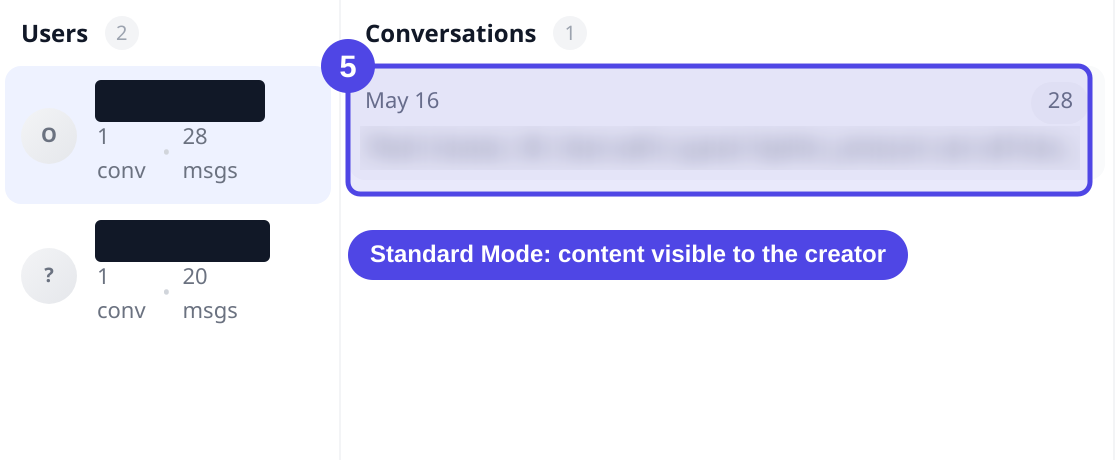
A Standard Mode agent, where the creator can read conversation content by design. Opens full size in a new tab.
Captured on an isolated staging replica of the production system, 21 September 2026. Names, emails and record identifiers are redacted for publication.
Support access is logged
When an authorized administrator opens a conversation to help with a support request, the system records who did it and never records what the conversation said.
Validated on staging 21 September 2026New control, shipping in the current release (pull request in review)View the walkthroughHide the walkthrough
When an authorised administrator opens a conversation in support tooling, the system records who did it and when, and never records what the conversation said. Unauthorised accounts are refused.
- 1
An authorised administrator opens a conversation
An administrator with support access reads a conversation through the internal tooling. The read succeeds.
Recorded output
GET /conversation-history/detail/{conversation_id}HTTP 200 · conversation returnedActing administrator identity forwarded on the request. Route path redacted to its shape.
- 2
An audit entry is written
The read writes one audit row. It records who acted, what they did and when. It stores a message count, and no message content.
Recorded output
- actor_email
- ••••@magif.ai (authorised administrator)
- action
- conversation_history.messages.read
- route
- /conversation-history/detail/{conversation_id}
- timestamp
- 2026-09-21T02:45:16Z
- metadata.message_count
- 2
No conversation content is stored in the log, only a message count.The recorded audit entry. Actor email and identifiers are redacted for publication.
- 3
An unauthorised account is refused
An account without support access that requests the audit log is rejected. The control fails closed.
Recorded output
GET /audit-logs (non-authorised account)HTTP 403 · refused - 4
Audit entries are kept for 400 days
Each audit row expires automatically after 400 days through a time-to-live index on the collection.
Retention is enforced by a time-to-live index set to 400 days.
This support-access audit control ships with the current release and is in review. It has not been running historically. Captured on an isolated staging replica of the production system, 21 September 2026. Names, emails and record identifiers are redacted for publication.
Deletion and GDPR rights
Your clients keep direct control over their data, whichever mode an agent runs in. The same rights apply to you as a coach for your own personal data.
- Chat without an account. Clients can chat anonymously. Anonymous conversations are identified by a random identifier, with no name and no email, and are deleted after 90 days of inactivity.
- Privacy is never downgraded. The privacy level a client starts chatting under is never lowered for that client afterwards.
- Deletion. Clients can delete their conversations. Deletion removes the conversation and its messages and the background jobs derived from it. A full deletion request also removes the agent's memory of that participant.
- GDPR rights. Access, rectification, erasure, restriction, portability and objection. Requests go to the privacy contact and are handled under GDPR.
Individual deletion
What a deletion request for one participant reaches in the active system, and how backups are handled separately.
A deletion request for a participant reaches the following active records:
- Conversation messages the participant exchanged with the agent
- The agent's memory of that participant
- Background jobs derived from those conversations
- The participant's link to those conversations
Active-system deletion
A valid deletion request removes the participant's active conversation records and the agent's linked memory of that participant from the production database where those records are identifiable, using the same deletion cascade that runs for user-initiated and automated deletion.
Backups
Deleted data may remain in encrypted backups until the relevant backup expires under the documented backup rotation, within 1 year at most. Backups are not used for normal product access.
Verified 21 September 2026View the walkthroughHide the walkthrough
We took one participant with active records, ran a deletion request for them on a single agent, and checked the same records again. Everything the request should reach read zero afterwards.
- 1
The participant’s records exist
Before the request, the participant has active records across the collections a deletion should reach.
Recorded output
Record Before Conversations 1 Agent memory 1 Background jobs (including detached) 1 - 2
The deletion request is executed
A single request removes the participant’s data for that agent and reports exactly what it removed.
Recorded output
DELETE /conversation/user-data/{agent_id}/{user_id}{ "deleted": true, "conversations": 1, "jobs": 1, "detached_jobs": 1, "memory": true }The route path is redacted to its shape. Response recorded verbatim.
- 3
The same records now read zero
Re-checked immediately after the request, every collection the deletion should reach is empty.
Recorded output
Record After Conversations 0 Agent memory 0 Background jobs (including detached) 0 - 4
Encrypted backups expire on a rolling schedule
Deletion clears the live system straight away. Encrypted backups are not edited record by record; they roll off on the retention schedule, and any restore re-applies the same deletion.
Encrypted backups are retained for at most one year and any restore re-applies retention and deletion rules.
Captured on an isolated staging replica of the production system, 21 September 2026. Names, emails and record identifiers are redacted for publication.
End users do not have to ask us to remove their data. They can see and delete it themselves, from their account or from inside any chat. Here is that flow, captured from the running product.
Verified 21 September 2026View the walkthroughHide the walkthrough
We signed in as a real end user, opened the privacy controls, and deleted our own data. The conversations and the memory the agents held were removed straight away. Anything that can only be removed by request is called out at the end.
- 1
Your data is listed in one place
Every signed-in user has a Privacy page in their account. It lists each agent they have chatted with and how much is held, so there is no guesswork about what is stored.
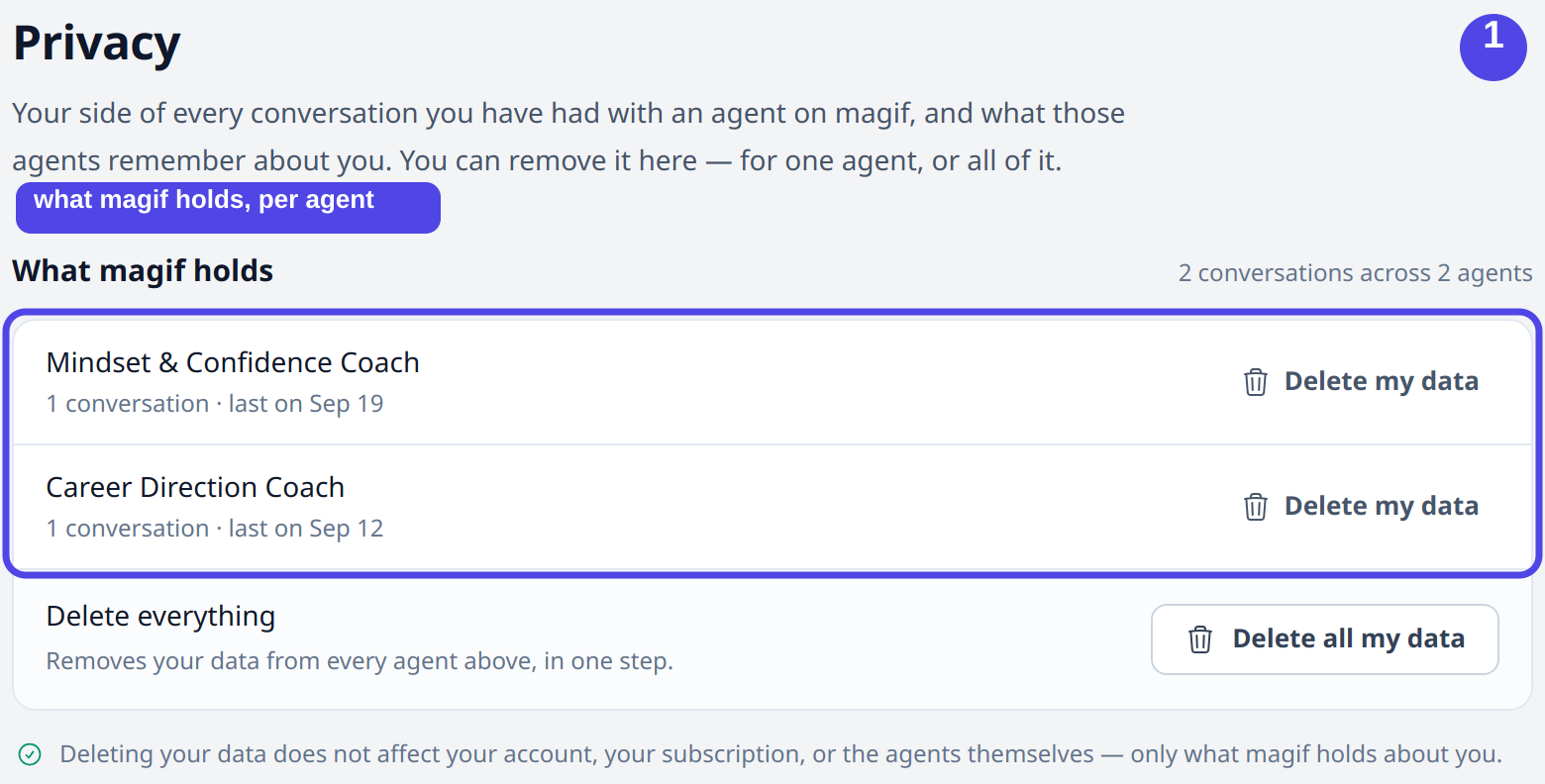
The account Privacy page: what magif holds, listed per agent. Opens full size in a new tab. - 2
You delete it yourself
Each agent has its own delete control, and a single button removes everything across every agent at once. The user does not need to contact anyone to do this.
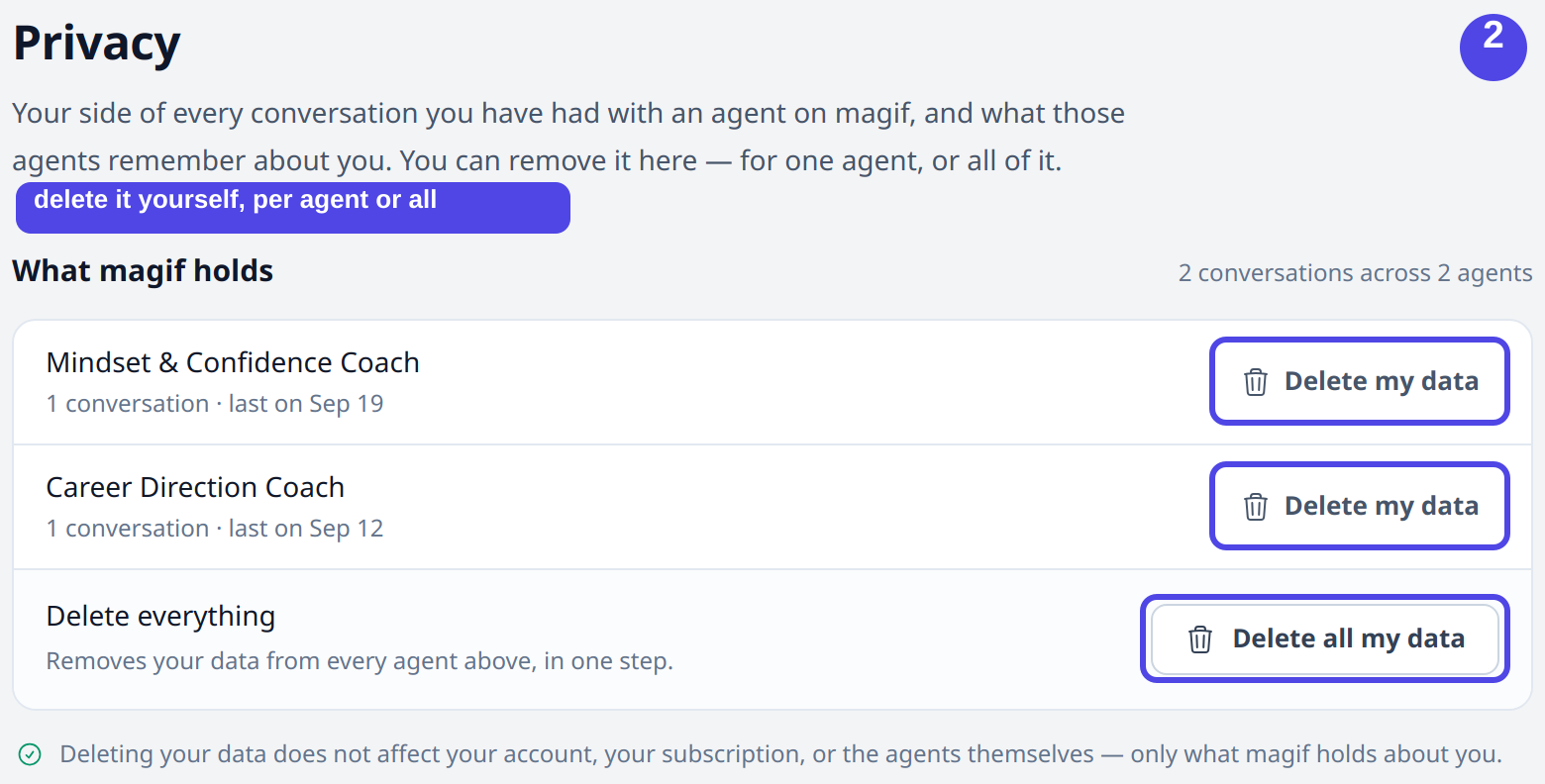
Delete controls: one agent at a time, or everything in one step. Opens full size in a new tab. - 3
You confirm before anything is removed
Deleting everything asks the user to type the word DELETE first, so an action that cannot be undone is always deliberate.
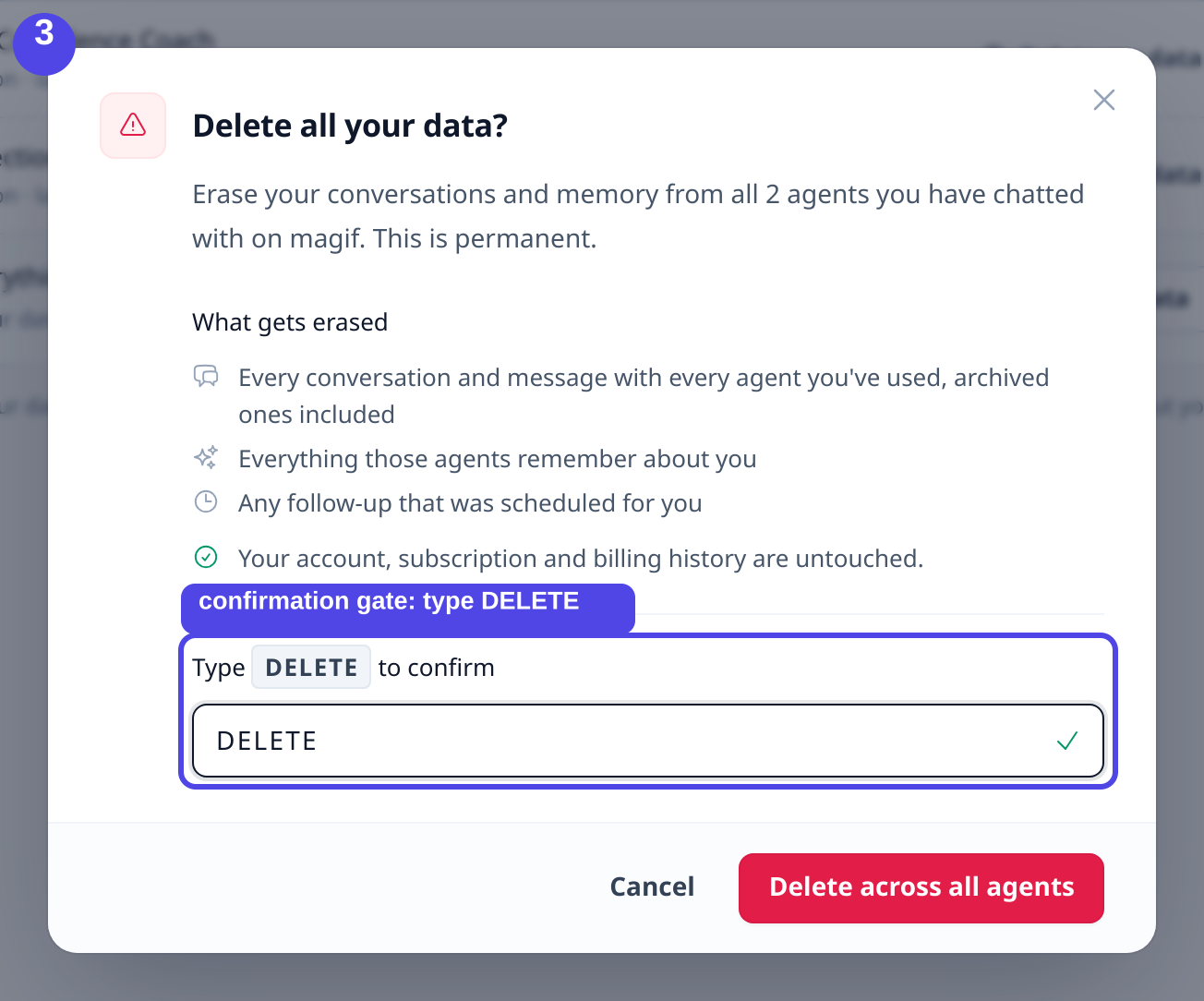
The confirmation step, which lists exactly what will be erased. Opens full size in a new tab. - 4
The data is gone from your view
Right after confirming, the page shows that the conversations and agent memory were deleted and that magif now holds no conversation data about the user. We re-checked the records directly and every one of them read zero.
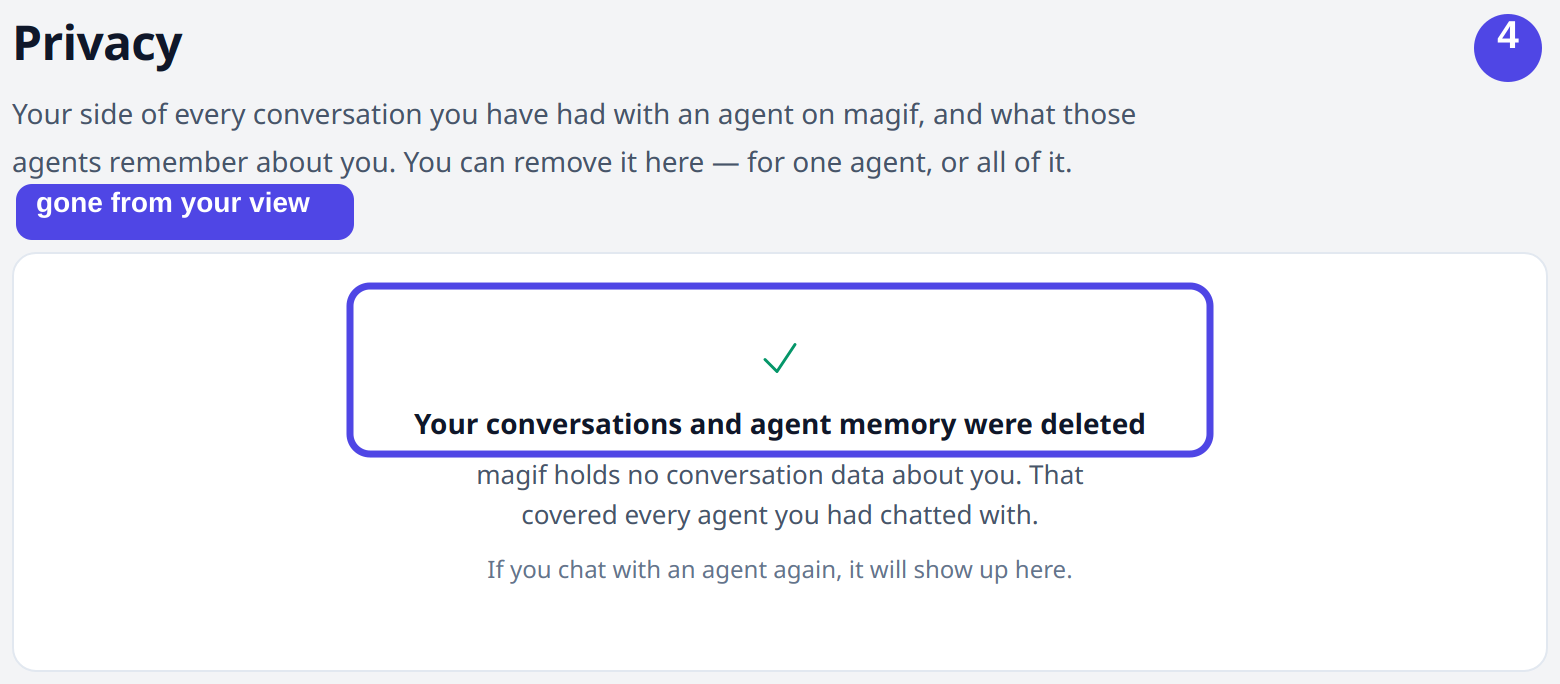
After deleting: the account holds no conversation data. Opens full size in a new tab. - 5
The same control lives inside every chat
Users who prefer to act from the conversation itself find the same control in the chat sidebar, under Your data, so deletion is always one step away.
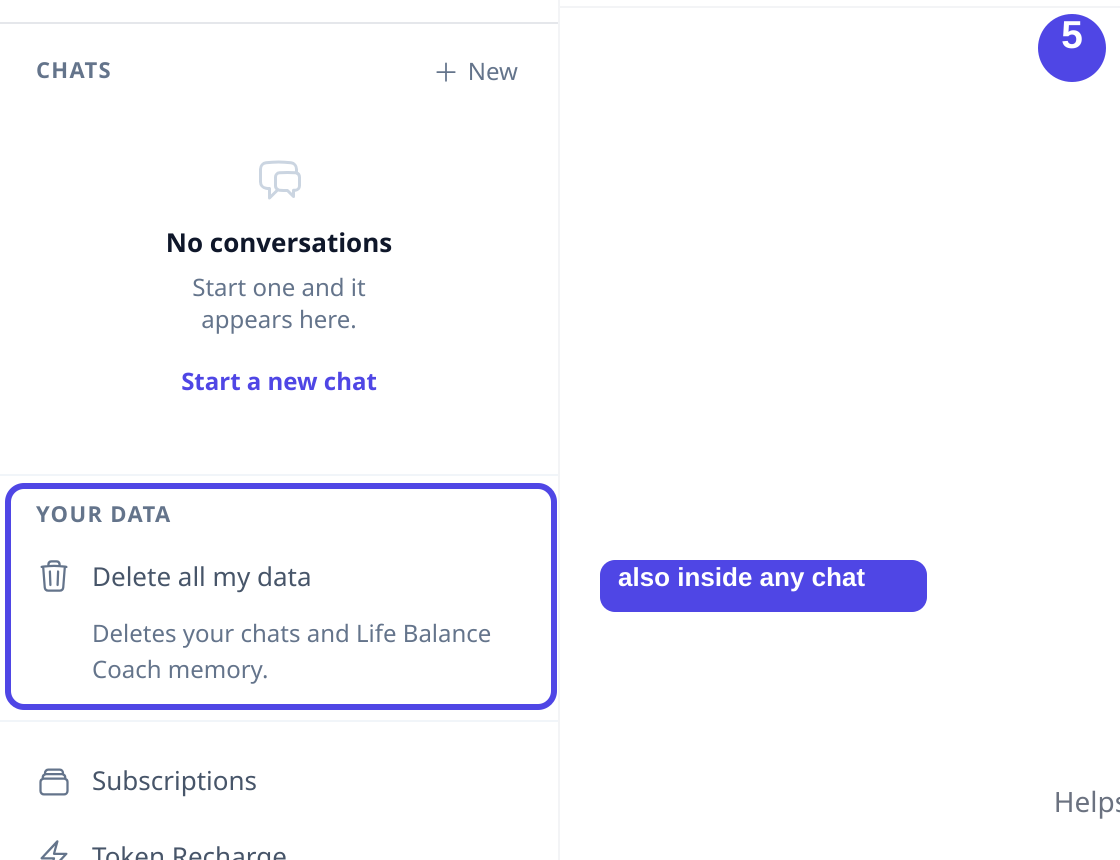
The same delete control, reached from inside a chat. Opens full size in a new tab. - 6
What still needs a request
Self-service covers the conversation data itself. A few things are kept until you ask us to remove them, so we say so plainly here.
Deleting your data here removes your conversations, the messages in them, what each agent remembers about you, and any follow-up that was scheduled for you. Your account and login, your subscription and billing history, and any files you uploaded during a chat are kept, and are removed on request by writing to [email protected].
Captured on an isolated staging replica of the production system, 21 September 2026. Names, emails and record identifiers are redacted for publication.
Deletion lifecycle
What happens when a conversation is deleted, from the live application through to encrypted backups.
- 1Deleting a conversation immediately removes it from the live application.
- 2The deletion runs through one shared cascade in the primary database: the conversation record and its messages, the background jobs derived from it, and, on participant account deletion or per-agent clearing, the agent's memory of that participant.
- 3The automated retention process uses the same cascade to clear inactive conversations and the memory tied to them.
- 4Encrypted backups expire on a rolling window of at most 1 year, so deleted records leave backups as those backups expire.
- 5Backup restores are exceptional recovery operations; retention rules continue to apply to restored data.
Data-subject requests
Contact [email protected] to make a data-subject request.